Topic-icon I couldn't register the new Microsoft login app

Active Subscriptions:

None
2 months 2 weeks ago - 2 months 2 weeks ago #69337 by alechu
 

I tried to register a new app for "Microsoft login" following your documentation, but I couldn't.

Please update your documentation - www.sourcecoast.com/jfbconnect/docs/soci...ad-application-setup
Attachments:
Last edit: 2 months 2 weeks ago by alechu.
The topic has been locked.
Active Subscriptions:

None
2 months 2 weeks ago #69338 by alechu
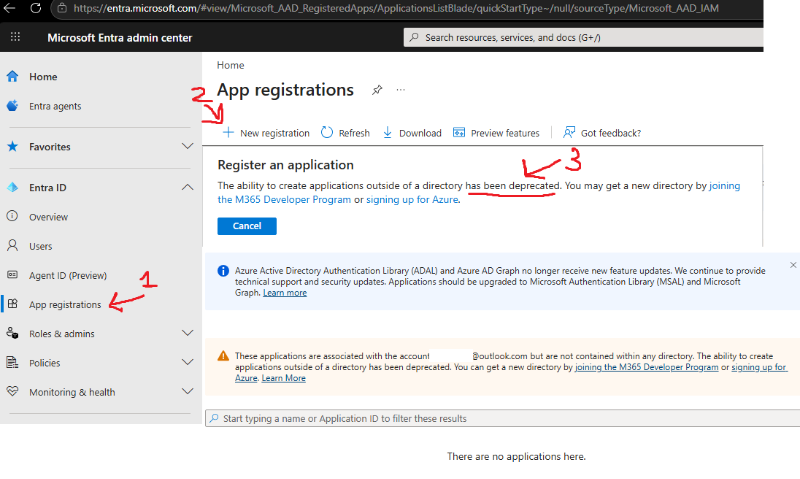
Azure Active Directory Authentication Library (ADAL) and Azure AD Graph no longer receive new feature updates. We continue to provide technical support and security updates. Applications should be upgraded to Microsoft Authentication Library (MSAL) and Microsoft Graph.

These applications are associated with the account but are not contained within any directory. The ability to create applications outside of a directory has been deprecated. You can get a new directory by joining the M365 Developer Program or signing up for Azure.

Microsoft says this is an outdated method, so how should I register this application for login now?
The topic has been locked.
Support Specialist
2 months 1 week ago #69339 by mel
* Go to portal.azure.com/
* Click the view button for Manage Microsoft Entra ID
* Click Add > App Registration
* Choose Any Entra ID Tenant + Personal account
* Add your redirect URL in the format of yourdomain.com/index.php
* Save

* Follow the existing app setup guide to get the Client ID and secret (I'll update the guide for the newer registration)

The topic has been locked.