Yes the Doc was in depth and of great interest but was not executed ever because of failed responses of support - it was a difficult time for everyone during the lock downs and I understand that all tech people where under pressure, Lets start with the connectivity of the social networks to start, and we can go step by step, I have not reviewed the doc in detail I sent it as reference.
These Social Connections have not worked ever and this needs to be resolved first so we can proceed with the auto sharing via channels especially.
This is a description that AI gave me, I am using AI to help with my conative disability, I am sorry for the length but I think its better than ongoing back an fourth - start out with all the info.
top-tier email to send directly to Alex at SourceCoast (JFBConnect), covering:
✔ The issue
✔ Your multi-site + MightySites architecture
✔ The requirement for unique login modules per slave site
✔ Automatic assignment to JomSocial groups
✔ Social login channels
✔ Auto-posting requirements
✔ Additional questions and support items he should address
You can copy/paste and send as-is.
EMAIL TO ALEX – JFBCONNECT / SOURCECOAST
Subject: Request for Technical Support – JFBConnect Social Login + MightySites Multi-Site Integration
Hi Alex,
I hope you’re doing well. I’m reaching out for support on a multi-domain setup using JFBConnect, MightySites, and JomSocial. We are trying to finalize correct login behavior across all slave sites, and I want to outline the issue and requirements clearly so we can resolve this with your guidance.
---
CURRENT SETUP
Master Site:
CommunityMarketplace.ca
Slave Sites (examples):
– MyCommunityTV.org
– givebackmom.com
– Allseasonsolutions.com
-CommunitySportsMatters.com
- LevelUpforLocal.com
– Many additional domains using MightySites (shared user table)
All sites share the same Joomla database user table, but each slave site represents a specific local community with its own JomSocial group, J-BusinessDirectory category, and unique branding.
We are using JFBConnect for all social logins.
We already created a custom plugin to detect the domain and assign the user to the correct JomSocial group based on the site they register from — but this plugin isn’t firing consistently because the JFBConnect login module isn’t loading properly on some slave sites.
---
THE ISSUE
On multiple slave sites, the JFBConnect login module or provider callback fails or does not redirect properly:
Example callbacks:
localcommunityhero.com/index.php?option=...ck&provider=facebook
legionbranch43.ca/index.php?option=com_j...ck&provider=facebook
The component appears to be installed globally, but the callback and provider configs don’t open properly on many slave domains under MightySites.
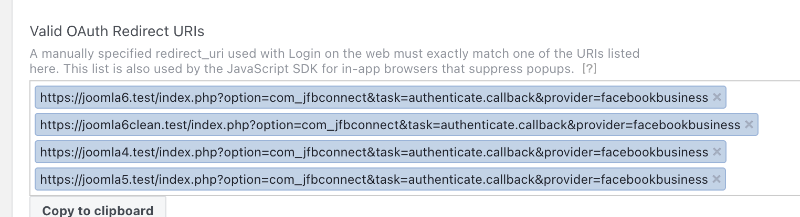
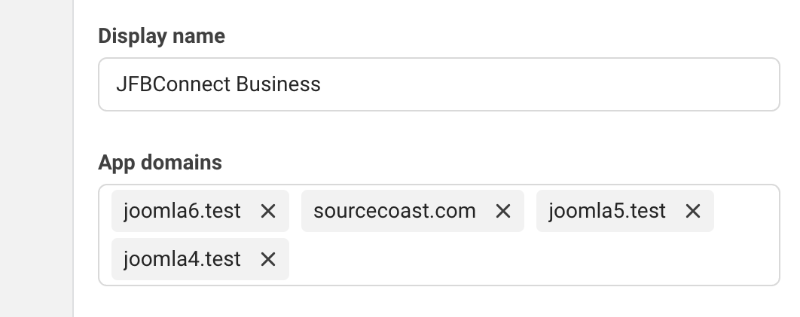
Additionally, Facebook/Google refuse validation unless all domains are configured properly — and we want to confirm the best way to configure multi-domain callback URLs under JFBConnect.
---
WHAT WE NEED JFBCONNECT TO DO
1. Per-Domain Login Modules
Each slave domain requires its own dedicated login module instance so the user logs in from that site's URL and is then:
✔ Redirected back to the correct domain
✔ Assigned to the local JomSocial group
✔ Tracked correctly by JFBConnect
We want to confirm with you the proper JFBConnect configuration under MightySites to support:
– Multi-domain return URLs
– Multi-domain callback URLs
– Auto-detection of domain in the provider callback
– Correct module placement on each slave site
---
2. Auto-Assign JomSocial Group by Domain
This already exists via our plugin, but we want confirmation on:
– Which JFBConnect triggers we should hook into
– Whether JFBConnect provides a clean event to detect provider callback completion
– Best practice for mapping domain → JomSocial group ID
– Support for both social login & username/password login
This is essential for our environment.
---
3. Social Login Channel Requirements
We intend to enable:
✔ Facebook
✔ Google
✔ LinkedIn
✔ Twitter / X
✔ Instagram (if possible)
✔ TikTok (if supported through custom provider config)
We need clarity on:
– The correct master callback domain
– Whether separate app credentials are needed per domain
– Recommended architecture for MightySites multi-domain social login
– Any changes required in provider configs for Facebook’s recent policy updates
4. Social Auto-Posting
We also want to utilize JFBConnect's social auto-posting capabilities for:
– JomSocial activities
– J-BusinessDirectory events, companies, offers
– Community articles (com_content)
We need clarification on:
– Whether auto-posting can be domain-specific under MightySites
– If each domain requires its own social app credentials
– Whether JFBConnect can auto-post based on category or group ID
– Best practices for multi-brand social auto-posting
5. What We Need From You / SourceCoast
To resolve this correctly, we need:
1. Confirmation of the correct JFBConnect configuration for a MightySites multi-domain shared-users environment
2. Instructions for proper callback URL structure for social login providers
3. Guidance on whether each domain must have its own Facebook/Google app, or if we should use one app with multiple domains in the settings
4. Recommended JFBConnect event triggers to tie into our plugin that assigns JomSocial groups after login
5. Steps to ensure the JFBConnect login module loads properly on slave domains
6. Any patches or known issues with MightySites + JFBConnect
7. Your recommended “full feature utilization checklist” so we can implement everything from SourceCoast correctly
---
OPTIONAL (IF AVAILABLE)
If SourceCoast has:
– A multi-site guide
– Recommended module configuration
– Example plugin for post-login user group or community assignment
– Known best practices for callback URLs
…we would appreciate those resources.
Once working, this will be the login engine used across domains under
---
Thank you, Alex

 I HAVE BEEN PAYING FOR YEARS - STILL HAS NOT WORKED CORRECTLY