Topic-icon Issue when using J4 and SCLogin

Support Specialist
1 year 10 months ago #69028 by mel
Replied by mel on topic Issue when using J4 and SCLogin
This looks to be a template issue. In the layout for your template, it is not rendering the component.

I verified this by going into your Template's style > Global settings area. In the After Head setting, I temporarily pasted the following at the end:
<div class="row">
        <jdoc:include type="component" style="xhtml"/>
    </div>
This renders the component. When I saved a reloaded, the login form was shown at the top of the page as expected since we're in the Users component.

You will need to contact your template company Joomlart to resolve the issue.

-Melissa

The topic has been locked.
Active Subscriptions:

None
1 year 10 months ago #69029 by LGASM
Tks a lot Mel!
I tried now in the front-end but it is still loading the home page contents with no form at the top, despite URL in browser switches to heloisamarra.com/registration/login/?ret...eSZ2aWV3PXJlcXVlc3Q=
Did you revert it back to previous state?
Best regards!
Luiz
The topic has been locked.
Support Specialist
1 year 10 months ago #69030 by mel
Replied by mel on topic Issue when using J4 and SCLogin
Yes, I only temporarily added it as a test, especially since it did not match the styling on your page at all. If you'd like to see what I did, follow the instructions on editing the template style custom javascript area.
The topic has been locked.
Active Subscriptions:

None
1 year 10 months ago #69035 by LGASM
Tks a lot Mel!

How can I properly and technically describe this issue to the Joomlart support team?
I really don't have a clue.
Best regards!
Luiz
The topic has been locked.
Support Specialist
1 year 10 months ago #69042 by mel
Replied by mel on topic Issue when using J4 and SCLogin
I would say something like the following:

I'm having trouble with my JAFlix template. When visiting a link that redirects to the com_users login view, the component (and its login form) is not displayed on my page with the template. (You can see the view at www.heloisamarra.com/registration/login/...eSZ2aWV3PWNvbmZpcm0=)
Can you please suggest how to set up the template style to output the component to the page? When I visit the Layout Settings, there are positions for modules but I don't see where the component view will be shown on the page.
The topic has been locked.
Active Subscriptions:

None
1 year 10 months ago #69043 by LGASM
Many thanks Mel!
I really wouldn't be able to describe it this way.
You nailed it!
Best regards!
The topic has been locked.
Active Subscriptions:

None
1 year 9 months ago #69061 by LGASM
Hi Mel!
Got the tempate fixed!
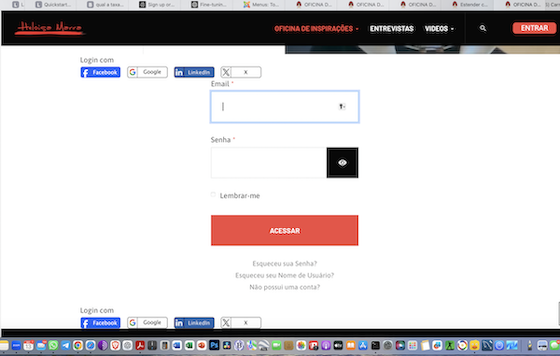
But odly enough I am still having the following issue: the user component now shows up but it is showing the email/password screen.
We're not using email/password login, only social login.
And the buttons for social login are doubled...
Kindly check the attached screenshot.
How can I fix this?
Best regards!
 
Attachments:
The topic has been locked.
Active Subscriptions:

None
1 year 9 months ago #69062 by LGASM
Hi Mel!
I managed to figure out how to fix the duplicate social login buttons using JFB Connect.
But still don't know how not to show e-mail and password fields on tha attached screenshot.
Tks a lot!
Best regards!
The topic has been locked.
Support Specialist
1 year 9 months ago #69063 by mel
Replied by mel on topic Issue when using J4 and SCLogin
The point of the user being redirected is to login to confirm the request. If you want to not require the user to login for a request, that'll be wherever you configured the privacy menu or the permissions for those menu items. I'm not familiar with com_privacy but I recommend double-checking your access on the menu items and permissions on the menu items and the menu module for Public users to create requests (or whatever it is that those menu items are configured for with com_privacy).
The following user(s) said Thank You: LGASM
The topic has been locked.