Topic-icon Can't get modal popup to work in Joomshaper Helix Ultimate Megamenu

Active Subscriptions:

None
Hi,

Joomshaper Helix Ultimate Megamenu allows me to load a module in its menu at www.certifiedinfosec.com/ in "Resources".

If SCLogin View Settings are set to "Always Visible", the login form displays properly and the login functions as expected.

However, If "Modal Popup" is selected, the button/text link appears in the menu, but does not function. I have already enabled [Load JQuery] in the sclogin module.

Any suggestions?
The topic has been locked.
Support Specialist
Sorry for the late reply. This sounds like it might be a styling conflict with the template / our module. I see a popup on a Resource page for administration which loads the SCLogin module, but I don't see a separate menu item that has the modal link in it. Is this still active so that I can see it in action?

-Melissa
The topic has been locked.
Active Subscriptions:

None
Hi Mel,

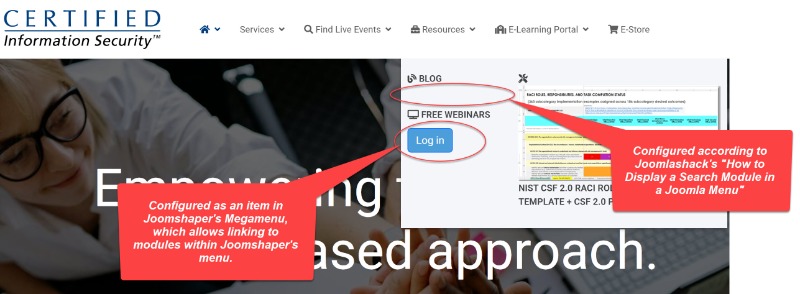
I created my own awkward workaround you found, but I have made the item available on the menu for testing in two different ways. I used Joomshaper's megamenu to create a menu item directly to the published SCLogin menu, and I redundantly created a menu item according to the Joomlashack directions for Modulesanywhere.

Neither link works. Please see attached.
Attachments:
The topic has been locked.
Active Subscriptions:

None
Bump. Mel, are you still there?
The topic has been locked.
Support Specialist
I started looking at it today to reproduce it on my test site. On both mine and yours, the modules anywhere solution does not actually add the module code to the page for that separator menu item and the helix ultimate template. However, on my test site, this solution worked when I switched to the standard Cassiopeia template.

The other solution with mega menu didn't appear to be appending the login module source code to the page properly, so when the button is pressed nothing will happen. I tried to call our script code to manually place it on the page, but that didn't work either with the helix ultimate template. So I was planning on looking at it more tomorrow to try to make some progress.
The topic has been locked.
Support Specialist
Could you try the following workaround to try to get the megamenu working?

1. In /modules/mod_sclogin/helper.php, add the following before the first function __construct line
public static $modalOutput;

2. In /modules/mod_sclogin/tmpl/login.php around line 86 could you replace
<?php echo HTMLHelper::_('bootstrap.renderModal', $modalId, $modalParams, $modalContents) ; ?>
with
[code[<?php
$val = HTMLHelper::_('bootstrap.renderModal', $modalId, $modalParams, $modalContents) ;
if (!$helper::$modalOutput)
$helper::$modalOutput = $val;
echo $helper::$modalOutput;
?>[/code]

If this works, I would suggest making a template override of the login file. I don't plan on checking this into the main sclogin codebase.

If you care about the source of why it's not working - It appears that the helix ultimate template megamenu is attempting to load the module multiple times. Somehow it and Joomla return the correct module contents the first time the module is loaded (with the login-modal div), but the subsequent times, the modal contents are not present correctly in the HTML.

Let me know how it goes.

-Melissa

The topic has been locked.
Active Subscriptions:

None
Hi,

I tried implementing your first suggestion per the attached graphic. It downed my site, so I had to revert. Evidently, I implemented your advice incorrectly.

Please advise.
Attachments:
The topic has been locked.
Support Specialist
Can you send us a contact us submission with FTP credentials? I can make the change and test.
The topic has been locked.